
Safe Surfer: Block Porn & Apps
Safe SurferParenting
3.8405.00 Reviews
- Version
- 3.9.7
- Installs
- 500.00K
- Age Rating
- Everyone
Screenshots
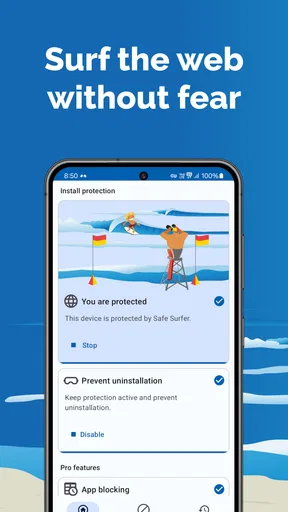
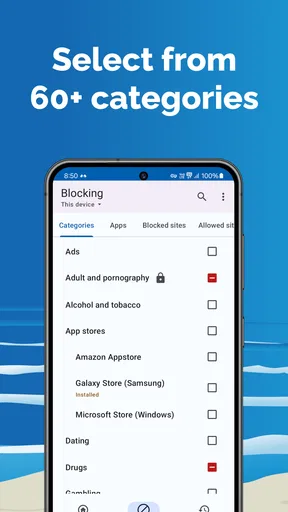
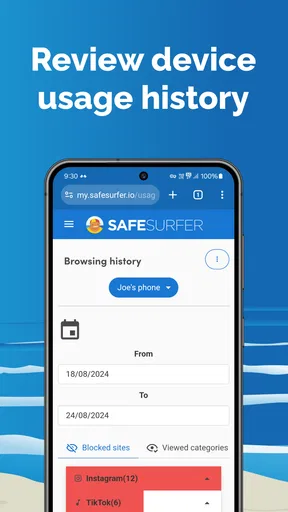
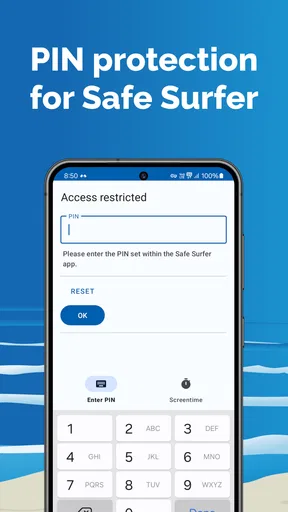
Our Review of Safe Surfer: Block Porn & Apps
 Analysis by Appyee
I’d consider Safe Surfer when the main goal is to make a phone’s online environment less exposed to adult material, especially when a parent and child need to agree on some boundaries. It is a parenting app from Safe Surfer, but its appeal is not limited to households: an adult who wants a practical barrier against distracting or unwanted content may also find it useful. I’d approach it as one part of a safety routine, not as a replacement for conversation, supervision, or a device’s own controls.
What you get before paying
The app is free to install, with in-app purchases listed from $1.49 to $5.49 per item. That makes it reasonable to try the basic experience before deciding whether any paid option is worthwhile. I would not treat the purchase range alone as proof that a particular feature is included at a particular price; check the choices shown in the app and decide based on what your household actually needs.
Safe Surfer has an average rating of 3.8 from around 5,000 ratings, and it has been installed over 500,000 times. Those figures suggest that plenty of people have tried it, while the rating also tells me not to assume every setup is smooth for every device or family. Its content rating is Everyone, and the current version is 3.8.14. The app first appeared on February 15, 2017, and it supports Android 5.1 and later.
Where the value comes from
For me, the useful idea is having content blocking and app restrictions in one place rather than relying only on a browser setting. That can make the app a practical starting point for parents who want to reduce access to unsuitable material without turning every device decision into a technical project. It can also help an adult create a deliberate pause between an impulse and opening a distracting app or site.
The best value is likely to come from setting clear, specific rules instead of trying to block everything. A family might agree to limit certain app categories while leaving school, messaging, and everyday browsing available. That approach is easier to live with and less likely to make a child feel that the phone has become unusable. I’d review the settings together and revisit them as a child’s needs change.
Where I’d be cautious
Filtering is not a substitute for trust or active parenting. No blocker should be treated as a guarantee that every unwanted page or app will be caught, and strict settings can create frustration if they interfere with ordinary tasks. I’d test the setup on the actual device and check that the sites and apps the family relies on still work as expected.
There is also a difference between a tool that blocks content and a complete parental-control system. If your priority is detailed screen-time schedules, location sharing, or a broad dashboard across several devices, compare Safe Surfer with the controls already built into your phone and with dedicated family-management tools. The right choice depends on which problem you are trying to solve, not on the number of features in a menu.
Hey there! So, I've been diving into an app called Safe Surfer: Block Porn & Apps. It's been quite the ride exploring its features, and I thought I'd share my thoughts with you. If you're on a mission to keep your online experiences safe and clean, this might just be the app for you.
Getting Started with Safe Surfer
I found the installation process to be pretty straightforward. You can easily grab it from the Google Play Store or the App Store, depending on whether you're team Android or iOS. Once it's on your device, setting it up is a breeze. The app guides you through the initial configuration, ensuring you're up and running in no time.
One of the things I appreciated right off the bat was the app's interface. It's clean, intuitive, and easy to navigate. You don’t need to be a tech wizard to figure out how to get the most out of it. Just follow the prompts, and you’re good to go!
Features that Stand Out
Now, let's talk about what makes Safe Surfer tick. The app is designed to block explicit content, which is perfect if you're trying to create a safer digital environment for yourself or your family. It not only blocks pornographic content but also restricts access to apps that might not be suitable for everyone.
One of my favorite features is the ability to customize what you want to block. The app allows you to set up specific filters, giving you control over what’s accessible. It’s like having a digital bouncer at your fingertips!
Another highlight is the VPN feature. Safe Surfer offers a built-in VPN that helps keep your online activity private. In today's world, where privacy is a big deal, having this added layer of security is a real plus.
The User Experience
While exploring the app, I noticed how smoothly it runs. I didn't experience any lag or crashes, which is always a relief. The performance is solid, and it doesn't seem to hog my phone's resources. That's a big win in my book because who needs an app that slows down their device?
Safe Surfer also provides great support for parents. If you’re a parent wanting to keep an eye on what your kids are doing online, this app offers some handy tools. You can set restrictions and monitor activity, which adds a layer of security for the whole family.
Everyday routines and practical checks
A realistic use case is a child borrowing a parent’s phone during a quiet stretch after school. I’d set the intended limits before handing it over, then let the child use the device for ordinary activities while checking afterward whether the restrictions felt fair and workable. The point is not to make every minute a surveillance exercise; it is to reduce a known risk while keeping the household rules understandable.
For a teen with their own phone, I’d make setup a conversation rather than a surprise. Explain which kinds of access are being limited and why, and let them tell you if a school or social app is being blocked by mistake. That small feedback loop is useful: it catches overly broad settings early and makes the controls feel less arbitrary. If a rule repeatedly interrupts homework or family communication, revise the rule instead of asking everyone to tolerate a broken routine.
For an adult using the blocker personally, I’d treat it as a speed bump rather than a promise of perfect self-control. Choose the sites or apps that cause the problem, keep necessary services available, and consider asking someone you trust to help you stick to the arrangement if that suits your goals. A filter can make an impulsive detour less convenient, but it cannot decide what boundaries are right for you.
How it fits beside other controls
Safe Surfer’s focus on filtering explicit material and restricting apps gives it a different emphasis from basic screen-time limits. A built-in device control may be the better first stop if you mainly want bedtime schedules, daily usage limits, or restrictions tied to a child account. A browser-only filter may be enough if the concern is confined to web searches on one browser. I’d look to Safe Surfer when content filtering across the browsing experience and app access are the central concerns, rather than assuming it replaces every other family tool.
Using more than one blocker can also make troubleshooting harder. If a legitimate page stops loading, you may not know which layer caused it, and overlapping rules can be confusing for the person using the phone. I’d start with one set of controls, test common tasks such as school research and messaging, and add another layer only if there is a clear gap. This is a practical way to avoid turning protection into a constant stream of false alarms.
The built-in VPN is worth understanding in proportion. It is presented as a privacy feature, but I would not treat the word “VPN” as evidence that every online activity becomes anonymous or that content filtering is infallible. For someone who needs a full privacy setup, I’d compare the app’s purpose with a dedicated privacy service and read the current in-app explanations before relying on it for sensitive activity.
Small setup choices that matter
Before tightening restrictions, I’d make a short list of must-work apps and sites: school portals, maps, calls, messaging, and any health or accessibility tools the person depends on. Test that list immediately after setup. This is more useful than waiting for a stressful moment to discover that a needed service has been caught in a filter, and it keeps the conversation focused on specific fixes rather than vague complaints.
I’d also agree on a process for exceptions. A child who needs a blocked resource for a class project should know how to ask for help, while a parent should know how to review the request without turning it into a confrontation. That workflow makes restrictions more sustainable than a blanket rule that nobody can question. For self-use, a written note about why a block was set can serve the same purpose when motivation changes.
One further trade-off is that convenience and strictness pull in opposite directions. Narrow, carefully chosen limits are easier to live with but may leave gaps; broad restrictions are simpler to explain but can block harmless material. I’d begin with the smallest set of rules that addresses the real concern, then adjust only after observing a concrete problem. That is a better test of value than enabling every option at once.
Who is likely to get the most from it
I can see the strongest fit for a parent who wants a focused way to reduce exposure to adult content and restrict selected apps, and who is willing to stay involved in the setup. It may also suit someone who wants a personal barrier and appreciates having filtering and app controls together. The free entry point lowers the risk of trying it, while the paid items make it sensible to check exactly what an upgrade adds before spending.
I’d skip it if you need a hands-off guarantee, if you expect a blocker to replace a conversation with your child, or if your main need is a detailed family dashboard with features beyond content and app restrictions. Someone who only needs a simple bedtime limit may be better served by the phone’s built-in settings. And if the VPN is the sole reason for installing it, I’d compare dedicated privacy options rather than assuming a parental safety app is automatically the right privacy tool.
Is It Worth It?
Overall, Safe Surfer: Block Porn & Apps is a solid choice for anyone looking to enhance their online safety. It’s packed with features that cater to both individual users and families. The app’s ability to block unwanted content and offer a private browsing experience makes it a must-have for those who prioritize digital safety.
There are plenty of options out there, but Safe Surfer manages to stand out with its ease of use and robust feature set. Whether you're new to digital safety apps or a seasoned pro, this app delivers on its promises. It’s definitely worth checking out if you're in the market for a reliable content blocker.
So, if you’re ready to take control of your online experience, give Safe Surfer a try. It might just be the tool you need to surf the web with peace of mind. Happy surfing!
Verdict
Strengths of Safe Surfer: Block Porn & Apps
- User-friendly interface for easy navigation.
- Comprehensive blocking of explicit content.
- Customizable settings for personalized control.
- Works smoothly across multiple devices.
- Low impact on device performance.
Limitations of Safe Surfer: Block Porn & Apps
- Limited free version features.
- Occasional false positives in blocking.
- Requires stable internet connection.
- No option for temporary disablement.
- Some features require premium upgrade.
Similar Picks in This Category
View All
Family Space
Motorola Mobility LLC.3.9

شرطة الأطفال - مكالمة وهمية
Oub Apps4.1

Findmykids: Parental Control
LETEM LTD4.6

Pregnancy + | Tracker App
Philips Electronics UK Limited4.8

Policía de niños - para padres
Kids police4.7

Pregnancy App
Amila4.9
Frequently Asked Questions
What is Safe Surfer and how does it work?
Safe Surfer is an app designed to block inappropriate content such as pornography on your devices. It works by utilizing a secure VPN connection that filters internet traffic, ensuring that harmful or explicit content is not accessible. This service is particularly useful for parents wanting to safeguard their children’s online experience.
Is Safe Surfer compatible with all devices?
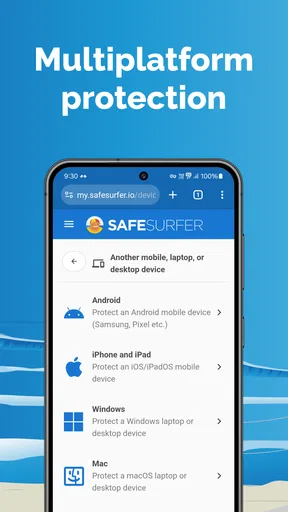
Safe Surfer is compatible with both Android and iOS devices. It offers a seamless experience across various smartphones and tablets. However, it’s always recommended to check the app’s requirements on the respective app store to ensure your device is supported before downloading.
Does Safe Surfer affect internet speed?
While Safe Surfer uses a VPN to filter content, it is optimized to minimize impact on your internet speed. Some users may notice a slight decrease in speed due to the additional layer of security, but the app is designed to maintain efficient browsing while providing protection.
Is Safe Surfer free to use?
Safe Surfer offers a free version with basic features such as blocking adult content. For more comprehensive protection and additional features like app blocking and detailed reports, users can opt for the premium version, which requires a subscription. Pricing details are available on the app store page.
How do I ensure Safe Surfer is working correctly?
To ensure Safe Surfer is functioning properly, check the app’s dashboard for a secure connection status. The app should notify you when it’s actively filtering content. Additionally, you can perform a test by attempting to access blocked content to see if the app restricts access as expected. Regular updates also help maintain optimal performance.
